EdTech · Admin dashboardAI · Full-stack
EEP Admin
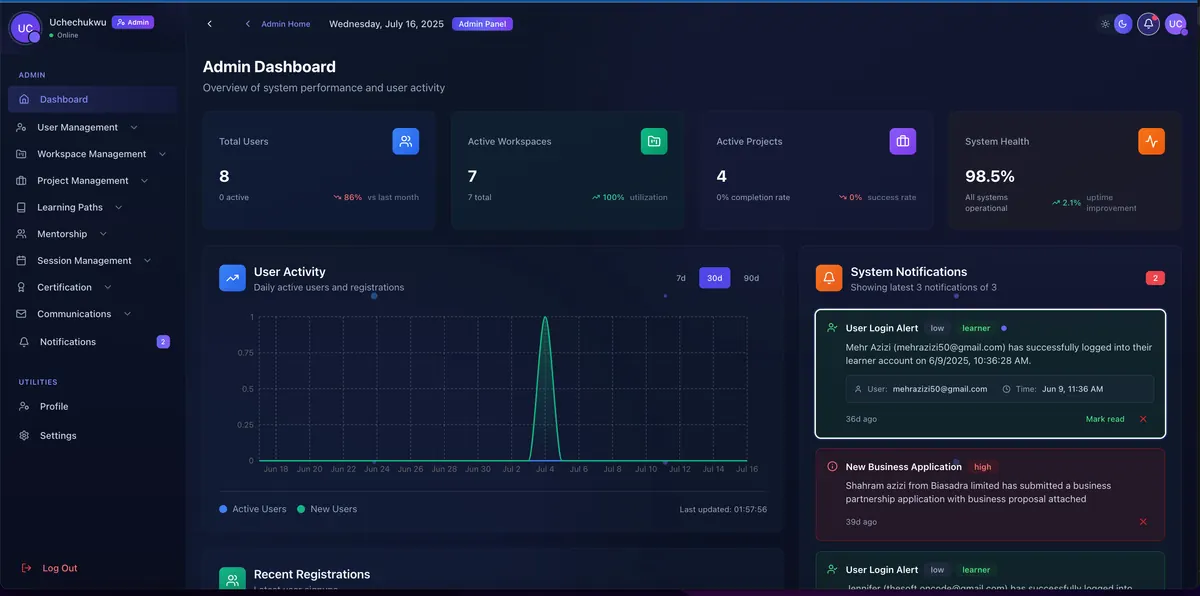
The control room for the EEP learning platform. Programme staff manage learners and mentors, build projects and learning paths, schedule sessions, oversee workspaces, and handle applications, contact messages and the newsletter, all behind two-factor sign-in.
- Status
- In progress
- Built for
- HitoAI Limited
- Role
- Lead full-stack engineer: designed and built it with the rest of EEP
- Timeline
- Feb – Jul 2025
Built with
- Next.js
- TypeScript
- Redux Toolkit
- Firebase
- Cloud Functions
- Firestore
- 2FA
The evidence
My part
Lead full-stack engineer: designed and built it with the rest of EEP
- Built user management: create users one at a time or in bulk, manage mentors, and see user statistics
- Built the project and learning-path builder: projects with areas and tasks, learning paths with milestones and skills, created and edited from the dashboard
- Built session scheduling and workspace oversight for staff
- Built communications: programme applications, contact messages, the newsletter and their statistics in one place
- Built notifications and admin settings
- Built the admin endpoints on the API behind it, with two-factor sign-in and an audit log of staff actions
What changed.
What it achieved so far.
One dashboard for people, content, sessions and communicatio
Bulk user creation for whole cohorts
Two-factor sign-in and an audit log on every admin action
Chapter 01
Running the programme
EEP's learners only see their own projects and sessions. The staff running the programme need the opposite view: every learner, every mentor, every project and what is happening in it. EEP Admin is that view, built alongside the learner's side and sharing its API.
Chapter 02
What staff can do
People: add learners one at a time or a whole cohort at once, manage mentors, and follow user statistics. Content: build projects with their areas and tasks, and learning paths with milestones and the skills they teach, which is what learners then work through. Activity: schedule sessions and look into any workspace.
Communications sit in one place too: applications to the programme from individuals and businesses, messages from the contact form, and the newsletter, each with its numbers.
Chapter 03
Safe by default
An admin account can change everything, so it is protected accordingly: two-factor sign-in with an authenticator app, checks on the server for every admin action rather than hidden buttons in the browser, and an audit log that records who changed what.